Online tyre change booking: how a tyre shop gets through the season without queues and phone calls
In tyre season the phone rings all day, and almost every call is the same question: “When can I come?” During every call the mechanic puts the wrench down and the car waits on the lift. Online booking software takes that question off your hands: drivers pick a free time themselves, timedule gives every car a free bay, and the registration number arrives with the booking. Follow this guide and you set up tyre change booking in one afternoon, before the busiest weeks start.
timedule: in use since 2022. From €14/month, no commission. We move your clients over for free. Try it free for 14 days.
The tyre season in dates
In Estonia, winter tyres are required from 1 December to 1 March. Studded tyres are allowed from 15 October to 31 March, and in wintry road and weather conditions from 1 October to 30 April (Transpordiamet).
In Latvia, cars must have winter tyres from 1 December to 1 March, and driving on studded tyres is banned from 1 May to 1 October (Road Traffic Regulations, point 219).
Elsewhere, check your local rules. For a tyre shop, the dates mean two peaks a year: in autumn from mid-October to early December, and in spring from March to the end of April. Inside each peak there is another one: the first snow. Then everyone wants a slot in the same week, and if the only way to get one is to call, the queue waits on the phone and outside the workshop.
In timedule, you open the calendar for the peak early: with Maximum days in advance set to 45, drivers can book up to the end of November by mid-October, and much of the autumn is in your calendar before the first snow.
Why the phone queue loses clients
In timedule data, 44% of online bookings are made outside weekdays 8–18 or at the weekend, and Monday is the busiest booking day of the week (see when clients book). In tyre season, that means two things:
- In the evening, your phone is quiet. A driver who thinks about tyres at 21:00 after work won't set a reminder to call you again tomorrow morning. They book wherever a free time shows straight away and booking takes two minutes.
- On Monday morning, everyone calls at once. Exactly when every lift already has a car on it. Every call interrupts the work, and every missed call is a client who rings the next workshop.
Even when you do answer, a call takes time: you look for a free slot together, ask about the car and the tyre size, and write it all on a note that goes missing later. timedule's booking page asks for the registration number itself, puts the car in a free bay, and the details are in the calendar at once.
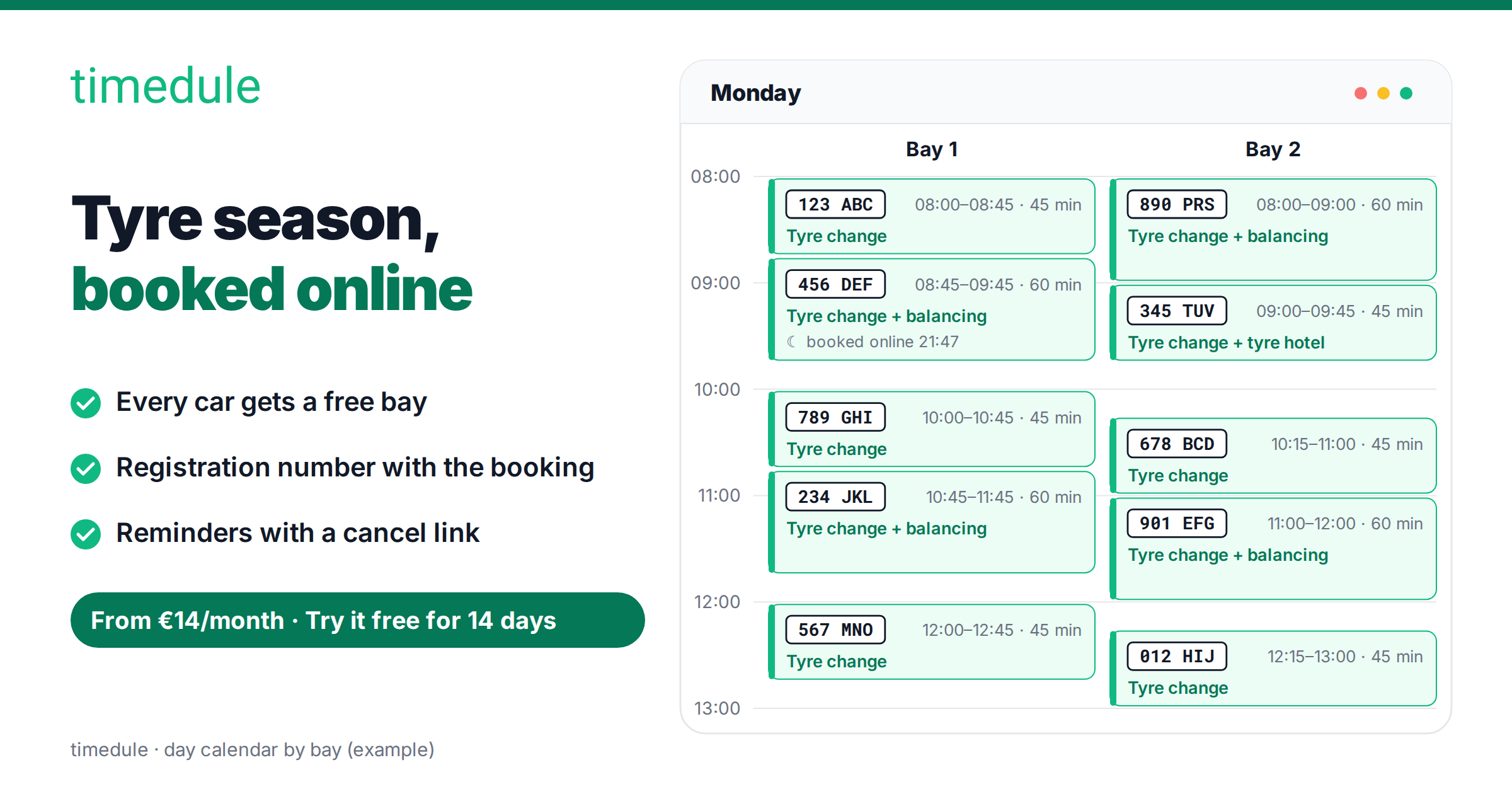
With timedule, your calendar is open while the workshop is closed. In the morning your dashboard shows the day bay by bay: what time, which job, which car and which bay.
How to set up tyre change booking
You set it up once: for the spring season everything is ready, and you only share your booking link again. You can set up everything below in timedule's free trial. SMS reminders start going out once your subscription is active. The same settings are described on our car service page.
- Add services with real durations. For example “Tyre change” 45 min, “Tyre change + balancing” 60 min, and “Tyre hotel” if you store tyres. Where the price depends on wheel size, set the price type to “From”: clients see the starting price and ask fewer questions. The calendar only offers times the whole job fits into, so a 60-minute job never lands in a 45-minute gap.
- Add lifts and bays as bookable resources. Open Settings → Features, switch on Bookable resources and call them “Bays”. Add each lift and tyre bay, and choose which jobs need a bay. A time is offered only when a mechanic and a suitable bay are both free, so two cars are never booked onto one lift at the same time. When a lift is under repair, mark it unavailable for that time and the other bays keep taking bookings.
- Ask for the registration number on the booking form. Open Booking website → Booking form, add a “Registration number” question and mark it Required. If you like, add “Tyre size” or “Rim size” too. The answers show with the booking and in the new-booking email, so the right tyres are out of storage before the car rolls in.
- Turn on reminders with a cancel link. timedule sends an SMS or email reminder before the visit. The email has the cancel link built in, and you can add it to the SMS. When a client cancels, the time is free again on your booking page at once, and the next driver can take it. Clients don't have to call to cancel, so that call is gone from your phone too. See also how reminders reduce no-shows.
- Take prepayment in season. If no-shows cost you during the peak, turn on Settings → Online payment. Clients pay the full price or a deposit when they book, and nobody skips a slot they have paid for lightly. When the season calms down, switch it off again.
- Limit how far ahead, and whether same day. Open Booking website → Booking rules, set Maximum days in advance (for example 45), and if needed turn on Disable same day bookings. That way no surprise online bookings land in a day that is already full, and you decide when the next weeks open.
Make booking easier for your clients
Let clients book online 24/7, send automatic reminders and cut no-shows. Set up your booking page in minutes.
No credit card required
Where to put the booking link
Every timedule account gets its own booking page. Put its link wherever drivers look for you:
- Google Business Profile. Drivers search “tyre change” plus their town on Google or Google Maps and see the nearest workshops on the map. Add your booking page as the appointment link in your Google Business Profile. Then the booking button sits right next to your map listing, and clients book without calling. While you are there, update the season's opening hours in the profile so they match your staff's working hours in timedule, and nobody drives up to a closed door.
- Website. Add a booking button to your website, or embed the whole booking page.
- Facebook page. Put the link on the page button and in the first post of the season: “Book your tyre change here.”
All three lead to the same booking page, so the calendar always shows one correct picture.
Checklist before the rush
Print it out and tick off each step when it's done:
- Services with real durations and a “From” price: tyre change, tyre change + balancing, tyre hotel.
- Settings → Features → Bookable resources on, called “Bays”, every lift and tyre bay added.
- A required “Registration number” question on the booking form, plus tyre or rim size if you like.
- SMS and email reminders on, with the cancel link in the message.
- Prepayment on, if no-shows cost you during the peak.
- Maximum days in advance set, same-day bookings disabled if needed.
- Booking link in your Google Business Profile, on your website and on your Facebook page.
Set up tyre change booking today
timedule is the easiest way to take tyre season off the phone: clients book themselves, in the evening and at the weekend too, every car gets a free bay, and the registration number comes with the booking. See how the car service booking system works with lifts and bays. From €14/month, no commission, and we move your existing clients over for free. Try timedule free for 14 days.
Online booking for your industry
Ready to dive in?
Start your free trial today.
Try our online booking software, and see how easy it is to manage your appointments.